
QuikSearch
High-performance offline Spotlight launcher, clipboard manager, text expander, and developer utility engine for Windows.

Project Overview
QuikSearch is a native, sub-millisecond Windows spotlight launcher and productivity utility engine. Operating 100% offline with zero cloud telemetry, QuikSearch combines instant app launching, multi-threaded file search, persistent clipboard history, text expansion snippets, color inspection, clipboard image tools, timestamp conversion, developer text transforms, system power controls, and a fast process RAM killer into a unified Alt+Space global hotkey.
Key Capabilities
Spotlight Engine & App Launcher
Summon instantly with Alt+Space. Features frosted glass aesthetics, keyboard-first navigation, and Start Menu app caching.
Smart Clipboard & Snippets
Persistent SQLite ring buffer tracking recent clipboard entries plus custom text expansion triggers (!email, !zoom).
Developer & Image Utilities
Universal color inspector (HEX/RGB/HSL/CMYK), UUID generator, JSON prettifier, case converter, Base64/URL codec, and native image save/PDF generator.
Process RAM Killer & System Controls
Monitor memory usage, terminate unresponsive PIDs in 0ms, lock workstation, empty recycle bin, and control system power states.
Technical Matrix
Legal Compliance
Find standard regulatory compliance files, data security rules, and deletion options for this service.
Product Gallery
Explore the interface, capabilities, and workflow of QuikSearch.
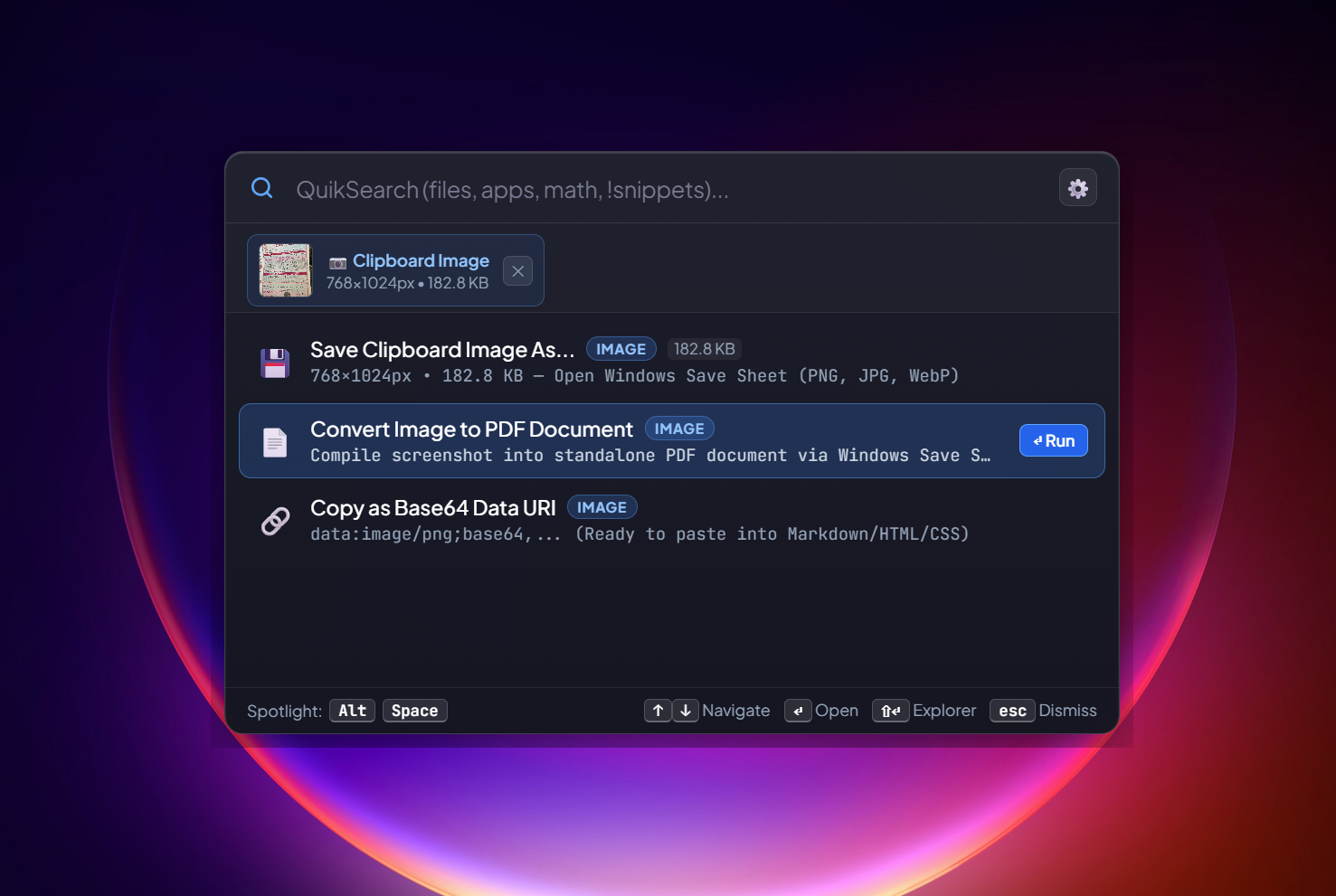
Convert Image to PDF & Clipboard Actions
Copy any image to your clipboard and summon Alt + Space to instantly access contextual image actions, format conversions, and PDF generation.
Release Trajectory
Complete production history, feature additions, hardware telemetry, and architectural optimizations shipped for QuikSearch.
High-performance document synthesis and hardware telemetry release. Integrates native PDF page merging, multi-format image to PDF compilation, and direct hardware metric lookups straight from Alt+Space.
Merge PDF Files
Seamlessly hides QuikSearch and summons the native Windows multi-file picker. Merges multiple PDF files with full page tree renumbering and instantaneous preview.
- Native Windows multi-file selection with zero latency
- High-performance document engine ensures lightning-fast assembly with zero memory leaks
- Auto-Open: Automatically launches the merged PDF in your default viewer the instant it is saved
Convert Images to PDF
Select multiple photos or images (JPG, PNG, WebP, BMP, GIF, TIFF) and immediately compile them into a standardized multi-page PDF document with one image per page.
- Supports JPG, PNG, WebP, BMP, GIF, and TIFF
- Standard-compliant multi-page generation with clean scaling
- Auto-Open upon save for instantaneous preview
Local IP Lookup (ip)
Displays your local IPv4 address (192.168.x.x). 1-click or Enter immediately copies your IP without needing cmd + ipconfig.
Disk Storage Analyzer (disk)
Shows all drives with free/total storage (e.g. C:\ — 120 GB free / 500 GB). Enter copies stats; secondary action reveals the drive in File Explorer.
RAM & Memory Monitor (ram / memory)
Real-time RAM status (e.g. RAM: 12.4 GB / 16.0 GB, 77% used). Enter copies current usage instantly without launching Task Manager.
CPU Processor Telemetry (cpu)
Displays processor architecture, model name, and active core count (e.g. AMD Ryzen / Intel Core, 16 cores) with one-click format copying.
High-Speed Document Engine Optimization
100% offline compilation with zero external runtime requirements or cloud dependencies.
Public rollout of the native, offline Windows Spotlight launcher, persistent SQLite clipboard manager, text expander, and developer utility engine.
Core Spotlight Engine & Native Architecture
Summoned instantly via Alt+Space with 0ms latency. Features Apple Spotlight frosted acrylic glass blur, full keyboard navigation, automatic boot autostart, and custom preferences.
Multi-Threaded File & Application Launcher
Pre-indexed Windows Start Menu applications launched in 0ms. Parallel file scanning across drives with category tags and Explorer reveal shortcuts.
Smart Clipboard History Manager
Persistent SQLite ring buffer tracking up to 100 entries, smart deduplication, relative timestamps, and one-click snippet conversion.
Fast Snippets Expander
Dedicated canned text manager with inline trigger expansion (!email, !zoom, !phone) straight from Spotlight.
Universal Color Inspector & CMYK Converter
Inspect and convert HEX, RGB, HSL, CMYK, HSV, and CSS colors with live visual color swatches and 1-click format copy.
Smart Clipboard Image Engine & Image Tray
Thumbnail chip above search bar for screenshots and browser images, native Windows save dialog for PNG/JPG/WebP, and 1-click PDF generator.
Smart Timestamp & Timezone Converter
Parse Unix seconds/milliseconds, ISO-8601, and keywords with 5 simultaneous representations (Local, UTC, ISO, Epochs).
Instant Developer Text Transforms
UUID v4 generator, JSON prettifier with 2-space indentation, multi-case converter (camelCase, snake_case, UPPERCASE), Base64/URL codec, word counter, and lorem ipsum.
System Power Controls & Fast Process RAM Killer
Instant screen lock, empty recycle bin, power states, and fast process RAM killer with live memory readout.
Universal Web Search & Direct URL Launcher
Instant YouTube and Google search shortcuts plus direct browser URL launching.
Frequently Asked Questions
What is QuikSearch?
QuikSearch is a high-performance, offline Spotlight launcher and productivity utility engine for Windows 10 and 11.
Is QuikSearch fully offline and private?
Yes, QuikSearch operates 100% offline with zero cloud telemetry. Your search queries, clipboard history, and text snippets never leave your device.
What global hotkey opens QuikSearch?
By default, pressing Alt + Space instantly summons and dismisses the spotlight window from anywhere in Windows.
What tools are built into QuikSearch?
QuikSearch includes multi-threaded computer search, Start Menu app launcher, persistent clipboard history, snippet text expansion, color conversion (HEX/RGB/CMYK/HSL), JSON formatting, UUID generator, clipboard image save/PDF export, Unix timestamp converter, system power controls, and a fast process RAM killer.
How do I install QuikSearch?
You can install QuikSearch directly from the official Microsoft Store. QuikSearch supports Windows 10 and Windows 11 (64-bit).